Example: The TemperatureConverterCtl3 Control
In Example: The SimpleCtl Control, Example: The TemperatureConverterCtl1 Control, and Example: The TemperatureConverterCtl2 Control, events generated by controls have been internal events, that is, events that have been detected and processed internally by the control itself.
A separate requirement is to be able to design a custom control that generates external events, that is, events that can be detected and handled by the page that is hosting the control. This example illustrates how to do this.
The TemperatureConverterCtl3 namespace is a copy of the TemperatureConverterCtl2 namespace, with some changes.
The first change is that it describes an event that the control is going to generate. This is done using ⎕NQ inside TemperatureConverterCtl3:
   2 ⎕NQ '' 'SetEventInfo' 'Export'
               (('Double' 'Fahrenheit')
                ('Double' 'Centigrade'))
In this case, the name of the event is Export and it will report two parameters named Fahrenheit and Centigrade, which are both of data type Double.
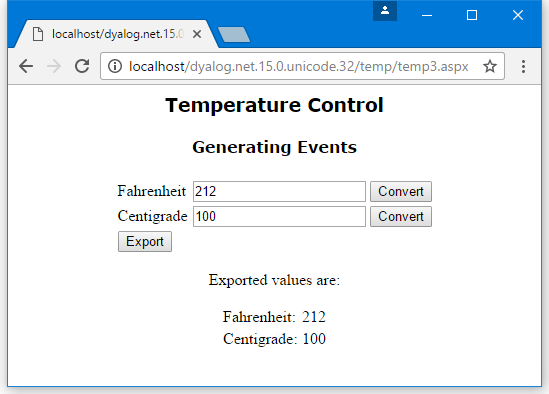
This version of the control presents a slightly different appearance to the previous one. The control is wrapped up in an HTML table, with the conversion buttons arranged in a column. These buttons generate internal events that are caught and handled by the control itself. The third row of the table contains an additional button labelled "Export" which will generate the Export event when pressed. The Render function is:
     ∇ Render output;TableRow;HTML;SET
[1]    :Access public override
[2]    :Signature Render  HtmlTextWriter output
[3]    TableRow←{
[4]        HTML←'<tr><td>',⍺,'</td><td><input name=',UniqueID
[5]        HTML,←' id=',⍺,'Value type=text '
[6]        HTML,←'value=',(⍕⍵),'></td>'
[7]        HTML,←'<td><input type=button value=Convert'
[8]        HTML,←' onClick="jscript:'
[9]        HTML,←(Page.GetPostBackEventReference ⎕THIS ⍺),'"></td></tr>'
[10]       HTML
[11]   }
[12]
[13]   HTML←''
[14]   HTML←'<table>'
[15]   HTML,←'Fahrenheit'TableRow _FahrenheitValue
[16]   HTML,←'Centigrade'TableRow _CentigradeValue
[17]
[18]   SET←'<tr><td><input type=button value=Export '
[19]   SET,←' onClick="jscript:'
[20]   SET,←Page.GetPostBackEventReference ⎕THIS'Export'
[21]   SET,←'"></td></tr>'
[22]   HTML,←SET,'</table>'
[23]   output.Write⊂HTML
     ∇
Line [18] causes the Export button to generate a Postback event that calls RaisePostBackEvent with the argument 'Export'. So far, this is just an internal event, like the events generated by the conversion buttons.
The RaisePostBackEvent propagates this event to the host page:
     ∇ RaisePostBackEvent eventArgument
[1]    :Signature IPostBackEventHandler.RaisePostBackEvent String eventArg
[2]    :Select eventArgument
[3]    :Case 'Fahrenheit'
[4]        _CentigradeValue←F2C _FahrenheitValue
[5]    :Case 'Centigrade'
[6]        _FahrenheitValue←C2F _CentigradeValue
[7]    :Case 'Export'
[8]        4 ⎕NQ'' 'Export'_FahrenheitValue _CentigradeValue
[9]    :EndSelect
     ∇
This is done by the third :Case statement, so that when the function is invoked with the argument 'Export', it fires an Export event. This is done by line [8] using 4 ⎕NQ. The elements of the right argument are:
[1] | '' | Specifies that the event is generated by this instance of the control |
[2] | 'Export' | The name of the event to be generated |
[3] | _FahrenheitValue | The value of the first parameter, Fahrenheit |
[4] | _CentigradeValue | The value of the second parameter, Centigrade |
The page that is hosting the control then responds to the event as appropriate.
Hosting the TemperatureConverterCtl3 Control on a Page
This example illustrates an ASP.NET web page that hosts the TemperatureConverterCtl3 custom control and responds to its Export event. The page uses a script written in APL, but it could also have been written in VB.NET.
<%@ Register TagPrefix="Dyalog" Namespace="DyalogSamples" Assembly="TEMP"%>

<script language="Dyalog" runat="server">
     ∇ ExportCB args;sender;e
[1]    sender e←args
[2]    (Flab Clab).Text←⍕¨e.(Fahrenheit Centigrade)
     ∇
</script>

<html>
<body>
<center>
<h2><font face="Verdana">Temperature Control</font></h2>
<h3><font face="Verdana">Generating Events</font></h3>

<form runat=server>
<Dyalog:TemperatureConverterCtl3 id="TempcvtCtl3" onExport="ExportCB" runat=server/>
</form>

<p>Exported values are:</p>
<table>
<tr><td>Fahrenheit:</td>
    <td><asp:Label id="Flab" Text="" runat="server"> </asp:Label></td>
</tr>
<tr><td>Centigrade:</td>
    <td><asp:Label id="Clab" Text="" runat="server"> </asp:Label></td>
</tr>
</table>
</center>
</body>
</html>
In this example, the host page associates a callback function ExportCB with the Export event. The ExportCB callback function is defined within the <script></script> section of the page – it sets the Text property of two Label controls to display the parameters reported by the event.
Figure 1 illustrates what happens when the page is run. The user can independently convert values between the two temperature scales and export these values from the control to the host page by pressing the Export button.