Example: The SimpleCtl Control
The SimpleCtl class is:
:Class SimpleCtl: Control
:Access public
:Using System
:Using System.Collections.Specialized,System.dll
:Using System.Web,System.Web.dll
:Using System.Web.UI
:Using System.Web.UI.WebControls
:Using System.Web.UI.HtmlControls

    ∇ Render output;HTML
      :Access public override
      :Signature Render  HtmlTextWriter output
      HTML←'<h3>Hello World</h3>'
      output.WriteLine⊂HTML
    ∇

:EndClass ⍝ SimpleCtl
The Render function supercedes the Render method that SimpleCtl has inherited from its base class, System.Web.UI.Control.
The Render method defined by the System.Web.UI.Control base class is void and takes a parameter of type HtmlTextWriter. When the SimpleCtl control is referenced in a web page, ASP.NET creates an instance of it and calls its Render method because it is a Control and is expected to have one. ASP.NET also supplies an object of type HtmlTextWriter as its parameter. It is not important where this object came from, or what it represents, only that HtmlTextWriter provides a method called WriteLine that can be used to output a text string to the browser – the mechanics of how this happens are handled by the HtmlTextWriter object.
In APL terms, the argument to the Render function, output, will be a namespace reference, and the function can call its WriteLine method with a character vector argument. This argument can contain any valid HTML string and defines the appearance of the SimpleCtl control.
Using the :Signature statement, the Render function is defined to have the same syntax as the method it overrides, that is, it does not return a result void and takes a single parameter of type HtmlTextWriter. To successfully replace the base class method, the Render function must have exactly this :Signature.
See Using the SimpleCtl Control for information on including the SimpleCtl control in any .NET web page.
Using the SimpleCtl Control
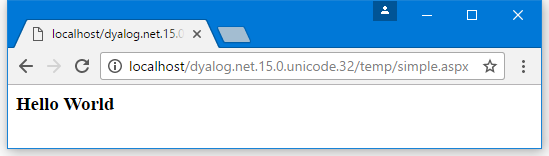
The SimpleCtl control can now be included in any .NET web page from which temp.dll is accessible. The file [DYALOG]\Samples\asp.net\temp\Simple.aspx) is one example (it is immaterial that it is written in Dyalog):
<%@ Register TagPrefix="Dyalog" Namespace="DyalogSamples" Assembly="temp" %>
<html>
<body>
<Dyalog:SimpleCtl runat=server/>
</body>
</html>
The first line of the script specifies that any controls referenced later in the script that are prefixed by Dyalog: refer to custom controls in the .NET namespace called DyalogSamples, which is located in the assembly temp.dll in the bin subdirectory.