Browsing .NET Classes
Microsoft supplies a tool for browsing .NET Class libraries called Ildasm.exe (this can be found in the .NET SDK and is distributed with Microsoft Visual Studio). Dyalog's Workspace Explorer has been extended to perform a similar task to ILDSAM so that the information is available within the context of the APL environment.
The information that describes .NET classes, which is known as its Metadata, is part of the definition of the class and is stored with it. Metadata corresponds to Type Information in COM, which is typically stored in a separate Type Library.
To gain information about one or more .NET Classes
- In the Tools menu, select Explorer...
The Windows Explorer panel is displayed. - In the Workspace Tree, right-click on MetaData.
- Select Load from the drop-down list.
The Browse .NET Assembly window is displayed. - Navigate to and select the .NET assembly of interest, and click Open.
The tree structure for the selected .NET assembly is displayed in the Workspace Tree.
The .NET classes provided with the .NET Framework are typically located in C:\WINDOWS\Microsoft.NET\Framework64\V4.0.30319 (on a 64-bit computer) – the final directory in this path is the version number. The most commonly-used classes of the .NET namespace system are stored in this directory in a .NET assembly called mscorlib.dll.
Opening the mscorlib.dll assembly displays an extensive hierarchy; its complexity is due to the structure of the Metadata. Within the mscorlib.dll assembly, opening Namespaces > System > Classes displays the list of classes contained in the System .NET namespace. Each class can be expanded to display multiple directories containing detailed information about the class. For example:
- the Constructors directory includes all of the valid constructors (.ctor files) and their parameter sets with which you can create a new instance of the Class (files with a .cctor extension and files labelled as "(Private)" can be ignored).
- the Properties directory includes all the properties supported by the Class.
- the Methods directory lists the methods supported by the Class.
Example
Within the tree structure of the mscorlib.dll Assembly, navigate to Namespaces > System > Classes > System.DateTime.
Open the Constructors directory.
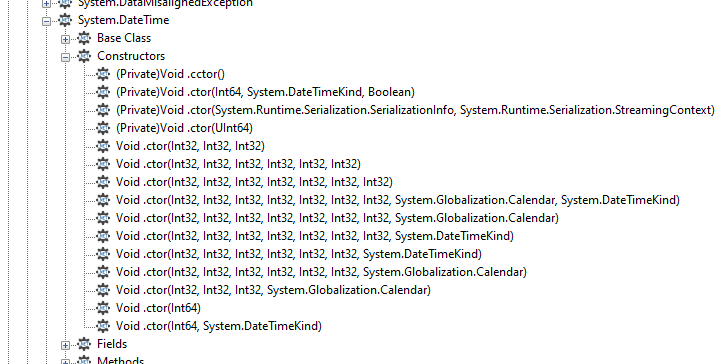
The image above shows the different constructors that are available when creating a new DateTime instance. From these constructors, it can be deduced that DateTime.New can be called with three numeric (Int32) parameters, or six numeric (Int32) parameters, or any of several other options.
This means that the following statement can be used to create a new instance of DateTime (30 April 2001 at 09:30):
      mydt←⎕NEW DateTime (2001 4 30 9 30 0)

      mydt
30/04/2001 09:30:00
Open the Properties directory.
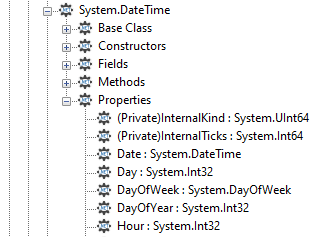
The image above shows the different properties and their data type, for example, the DayOfYear property is of type Int32.
A property can be queried by direct reference:
      mydt.DayOfWeek
Monday
The data types of some properties are not simple data types, but are .NET Classes. For example, the data type of the Now property is SystemDateTime. This means that references to the Now property return an object that represents an instance of the System.DateTime object:
      mydt.Now
07/11/2001 11:30:48
      ⎕TS
2001 11 7 11 30 48 0
Open the Methods directory.
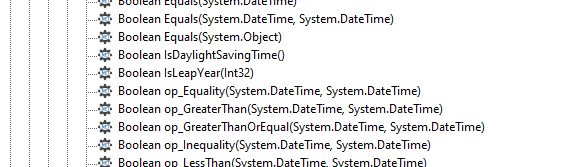
The image above shows the data type of the result of the method, followed by the name of the method and the types of its arguments, for example, the IsLeapYear method takes an Int32 parameter (year) and returns a Boolean result:
      mydt.IsLeapYear 2000
1
Many of the reported objects are listed as Private, which means that they are inaccessible to users of the class and cannot be called or have their value inspected. For more information about classes, see the Dyalog APL Programming Reference Guide.
Value Tips for External Functions
Value Tips can be used to view the syntax of external functions. If you hover over the name of an external function, the Value Tip displays its Function Signature.
For example, the following image shows the mouse hovered over the external function dt.AddMonths, which reveals that it requires a single integer as its argument.
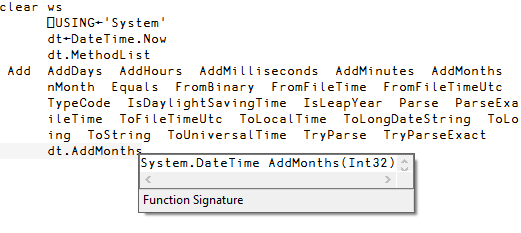
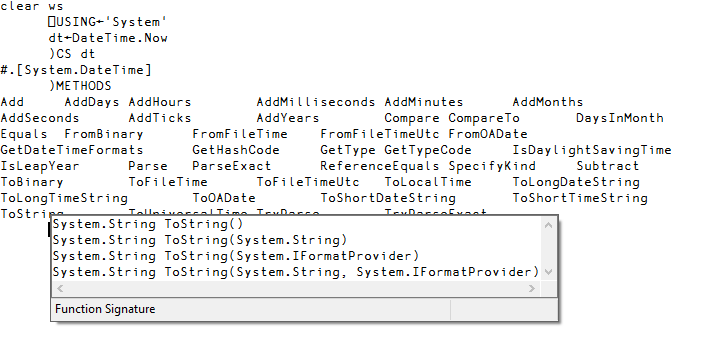
If an external function provides more than one signature, then they are all shown in the Value Tip. For example, the figure below shows that the function ToString has four different overloads).