Creating Programs (.exe) with APL Source Files
The following examples, which illustrate how you can create an executable program (.exe) directly from an APL source file, can be found in the [DYALOG]\Samples\bound_exe directory.
Example: Simple GUI
The following APL source file (eg1.apln) illustrates the simplest possible GUI application that displays a message box containing the string "Hello World":
:Namespace N
⎕LX←'N.RUN'
∇RUN;M
'M'⎕WC'MsgBox' 'A GUI exe' 'Hello World'
⎕DQ'M'
∇
:EndNamespace
The code must be contained within :NameSpace and :EndNamespace statements, and must define a ⎕LX either in the code itself or as a parameter to the dyalogc command.
This is compiled to a Windows executable (.exe) using dyalogc and run from the same command window (see Figure 1).
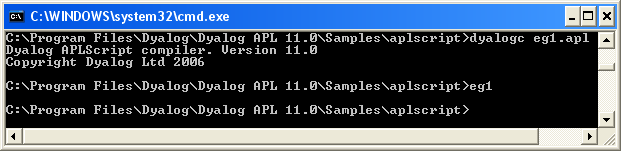
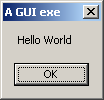
The resulting executable can be associated with a desktop icon, and will run without a command prompt window. Any default APL output that would normally be displayed in the session window will be ignored.
Example: Simple Console
The following APL source file (eg2.apln) illustrates the simplest possible application that displays the text "Hello World":
:Namespace N
⎕LX←'N.RUN'
∇RUN
'Hello World'
∇
:EndNamespace
The code must be contained within :NameSpace and :EndNamespace statements, and must define a ⎕LX either in the code itself or as a parameter to the dyalogc command.
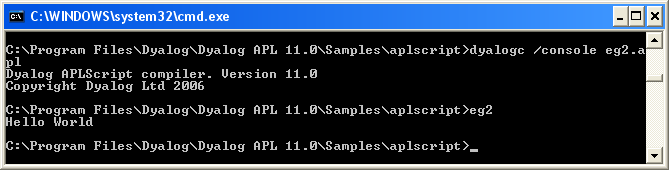
This is compiled to a Windows executable (.exe) using dyalogc and run from the same command window (see Figure 3). The /console flag instructs the Dyalog .NET Compiler to create a console application that runs from a command prompt. In this case, default APL output that would normally be displayed in the Session window is instead displayed in the command window from which the program was run.
Defining Namespaces
At least one namespace must specified in an APL source file. Namespaces are specified in an APL source file using the :Namespace and :EndNamespace statements. Although you can use ⎕NS and ⎕CS within functions inside an APL source file, you should not use these system functions outside function bodies; such use is not prevented, but the results will be unpredictable.
:Namespace Name introduces a new namespace relative to the current namespace called Name.
:EndNamespace terminates the definition of the current namespace. Subsequent statements and function bodies are processed in the context of the original space.
All functions specified between the :Namespace and :EndNamespace statements are fixed within that namespace. Similarly, all assignments define variables inside that namespace.