Temperature Converter Class
You may create user-defined Classes based upon Dyalog GUI objects as illustrated by the Temperature Converter Class which is listed overleaf.
To base a Class on a Dyalog GUI object, you specify the name of the object as its Base Class. For example, the Temperature Converter is based upon a Form:
:Class Temp: 'Form'Being based upon a top-level GUI object, the Temperature Converter may be used as follows:
T1←⎕NEW Temp(⊂'Posn'(68 50))
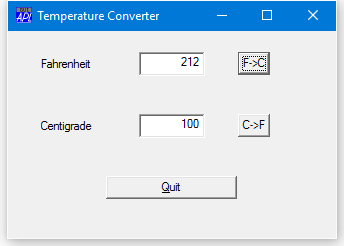
Temperature Converter Example
:Class Temp: 'Form'
    ∇ Make pv;TITLE
      :Access Public
      TITLE←'Temperature Converter'
      :Implements Constructor :Base (⊂'Caption' TITLE),pv,
                                   ⊂('Size' (30 40))
      MB←⎕NEW⊂'MenuBar'
      MB.(M←⎕NEW'Menu'(,⊂'Caption' '&Scale'))
      MB.M.(C←⎕NEW'MenuItem'(('Caption' '&Centigrade')
                             ('Checked' 1)))
      MB.M.(F←⎕NEW'MenuItem'(,⊂('Caption' '&Fahrenheit')))
      LF←⎕NEW'Label'(('Caption' 'Fahrenheit')
                     ('Posn'(10 10)))
      F←⎕NEW'Edit'(('Posn'(10 40))('Size'(⍬ 20))
                   ('FieldType' 'Numeric'))
      LC←⎕NEW'Label'(('Caption' 'Centigrade')
                     ('Posn'(40 10)))
      C←⎕NEW'Edit'(('Posn'(40 40))('Size'(⍬ 20))
                   ('FieldType' 'Numeric'))
      F2C←⎕NEW'Button'(('Caption' 'F->C')('Posn'(10 70))
                       ('Default' 1))
      C2F←⎕NEW'Button'(('Caption' 'C->F')('Posn'(40 70)))
      Q←⎕NEW'Button'(('Caption' '&Quit')('Posn'(70 30))
                     ('Size'(⍬ 40))('Cancel' 1))
      S←⎕NEW'Scroll'(⊂('Range' 101))
      MB.M.C.onSelect←'SET_C'
      MB.M.F.onSelect←'SET_F'
      F2C.onSelect←'f2c'
      F.onGotFocus←'SET_DEF'
      C2F.onSelect←'c2f'
      C.onGotFocus←'SET_DEF'
      onClose←'QUIT'
      Q.onSelect←'QUIT'
      S.onScroll←'c2f_scroll'
    ∇

    ∇ f2c
      C.Value←(F.Value-32)×5÷9
    ∇
    ∇ c2f
      F.Value←32+C.Value×9÷5
    ∇
    ∇ c2f_scroll MSG
      ⍝ Callback for Centigrade input via scrollbar
      C.Value←101-4⊃MSG
      c2f
    ∇

    ∇ f2c_scroll Msg
      ⍝ Callback for Fahrenheit input via scrollbar
      F.Value←213-4⊃Msg
      f2c
    ∇
    ∇ Quit
      Close
    ∇
    ∇ SET_DEF MSG
      (⊃MSG).Default←1
    ∇
    ∇ SET_C
      ⍝ Sets the scrollbar to work in Centigrade
      S.Range←101
      S.onScroll←'c2f_scroll'
      MB.M.C.Checked←1
      MB.M.F.Checked←0
    ∇
    ∇ SET_F
      ⍝ Sets the scrollbar to work in Fahrenheit
      S.Range←213
      S.onScroll←'f2c_scroll'
      MB.M.F.Checked←1
      MB.M.C.Checked←0
    ∇
:EndClass ⍝ Temp
The :Implements Constructor statement of its Constructor Make:
:Implements Constructor :Base (⊂'Caption' TITLE),pv,
                             ⊂('Size' (30 40))
passes on the application-specific property list (pv) given as its argument, but (in this case) specifies Caption and Size as well. The order in which the properties are specified in the :Base call ensures that the former will act as a default (and be overridden by an application-specific Caption requested in pv), whereas the specified Size of(30 40) will override whatever value of Size is requested by the host application in pv.
Other Instances can co-exist with the first:
      T2←⎕NEW Temp(('Caption' 'My Application')
                   ('Posn'(10 10))